Help Our Stories Reach Everyone!
Donate to the project today...
As we move toward the finish line, I also want to remind everyone that if you have not yet made a donation to help fund the Audible project, now is a wonderful time to do so. Every contribution—no matter the amount—helps bring this vision to life.
Help Our Stories Reach Everyone!
Donate to the project today...
As we move toward the finish line, I also want to remind everyone that if you have not yet made a donation to help fund the Audible project, now is a wonderful time to do so. Every contribution—no matter the amount—helps bring this vision to life.
Welcome Authors!
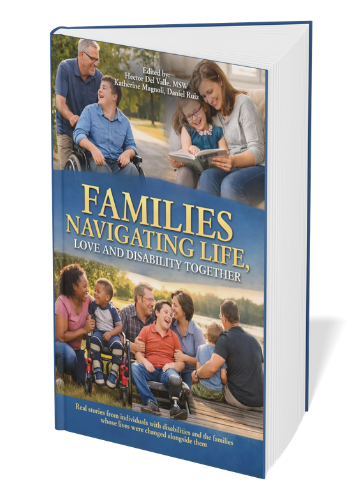
We are excited to get each one of your stories, in your voice, for our Audible audiobook, making our book more accessible so that individuals and families can listen and be encouraged wherever they are.
Thank you all for your continued support, encouragement, and belief in this project. Together, we’re expanding the reach of these powerful stories and making a greater impact in the lives of families navigating life, love, and disability.
Here, you will find all the necessary information and detailed guidelines to successfully complete your voice sample for your chapter. This includes tips on recording techniques, equipment recommendations, and specific criteria to ensure your submission meets the project's standards.
Author Voice Sample for AI
-
Voice Recording & AI Use Consent & Release AgreementDownload List Item 1
-
Author Recording GuideDownload PDF List Item 2
See instructions below, or download the PDF file.
-
Option #1: Upload Voice Sample Directly to Google DriveUpload Your Sample Now List Item 3
Click the link, select your file, and upload. No Google account required.
-
Option #2: Submit Google Form for Voice Sample SubmissionSubmit Your Sample Now List Item 4
Prefer a guided experience? The form walks you through the submission step by step and lets you attach your file directly.
*You will need to have a Google account for this option.
Also, the file size is limited to 1GB in this form; however, it shouldn't be an issue as depending on your recording method here are the approximate file sizes for a 5 minute recording:
WAV format (highest quality, largest file size)
A 5-minute WAV file at 44.1kHz stereo runs approximately 50–55 MB.
MP3 at 192kbps (the minimum acceptable quality)
A 5-minute MP3 at 192kbps runs approximately 7 MB.
M4A (iPhone default format)
A 5-minute M4A voice memo runs approximately 5–8 MB depending on the device settings.
Your Recording Guide.
You don't need a professional studio. You don't need expensive equipment. You just need a quiet space, a few minutes, and the same courage that got your story on the page in the first place. I'll handle everything else.
— Hector Del Valle, MSW · HDV SpeaksWe're creating an audiobook version of our collaboration book for Audible. Instead of hiring one generic narrator to read every chapter, we're using AI technology to give each author their own voice in the audiobook — so your chapter sounds like you.
To do that, we need a short sample recording of you reading naturally. From that sample, the AI learns your voice and narrates your full chapter. You only need to record 2 to 5 minutes — that's it. The whole process, start to finish, should take you less than 30 minutes.
Before you record: Make sure you've returned your signed Voice Consent & Release Agreement. If you haven't received it or have questions about it, contact Hector before submitting your recording.
Open your chapter and choose any passage you'd like to read aloud for your sample. There's no wrong choice — just pick something that feels natural and representative of how you write and speak.
Pick something you're comfortable with. If you wrote a section that flows naturally when you say it aloud, that's your passage.
Avoid very short sentences or lists. The AI learns best from conversational, flowing speech. A paragraph of narrative or reflection works better than a bulleted section.
Aim for 2–5 minutes of reading. At a natural pace, that's roughly 300–750 words. You don't need to time it precisely — just read until it feels complete.
Read it through once before recording. A quick rehearsal makes a real difference. You'll catch any words that trip you up and settle into your natural rhythm.
The most important thing about your recording environment isn't the equipment — it's the room. Here's how to set yourself up for a clean recording wherever you are.
- A bedroom with soft furnishings (bed, curtains, carpet absorb echo)
- A small closet — seriously, clothes are excellent sound absorbers
- A carpeted living room with the TV off
- A car parked in a quiet spot (the seats absorb sound beautifully)
- A room with bookshelves — books break up echo
- Kitchens and bathrooms — hard surfaces create echo
- Rooms near a busy street or noisy HVAC
- Anywhere with a fan, air conditioner, or refrigerator hum in the background
- Open outdoor spaces — wind ruins recordings
- Coffee shops or any public space
Quick echo test: Stand in your chosen space and clap once sharply. If you hear a clear echo or reverb, find a different spot. If it sounds flat and dull, you're in a good room.
You do not need special equipment. A modern smartphone records more than well enough for this purpose. Below are instructions for the most common devices.
- Open the Voice Memos app (it's built in — search for it)
- Tap the red circle to start recording
- Hold phone 6–8 inches from your mouth
- Read your passage naturally
- Tap the red square to stop
- Tap the recording, then the three dots (…) → Share → Save to Files or email to yourself
- Open Voice Recorder or Sound Recorder(search your apps)
- Samsung: look for "Voice Recorder" in your app drawer
- Tap the red microphone button to start
- Hold phone 6–8 inches from your mouth
- Read your passage
- Tap Stop, then find the file in your recordings folder to share
- Mac: Open QuickTime Player → File → New Audio Recording → click the red button
- Windows: Search "Voice Recorder" in the Start menu → Open → click the microphone
- Speak toward the built-in mic or plug in earbuds with a mic
- Stop, then save the file to your desktop
Earbuds with a microphone(like the ones that come with a smartphone) held near your mouth are a simple upgrade if you have them. They often record cleaner than a device's built-in mic. If you don't have them, the built-in mic works fine.
The AI is listening for you — your natural rhythm, your pauses, your tone. The more natural you sound, the better it will replicate your voice across the full chapter.
- Read at your normal conversational pace — not too slow, not rushed
- Speak clearly but naturally, the way you'd read aloud to a friend
- Pause briefly at commas and periods — let the punctuation breathe
- If you stumble, pause for 2 seconds and re-read the sentence from the beginning
- Keep the mic 6–8 inches from your mouth throughout
- Sit comfortably — your posture affects how you breathe and sound
- Don't "perform" or use a dramatic announcer voice — just be you
- Don't hold the mic directly in front of your mouth — breath pops will ruin the recording
- Don't record in one take if you make errors — just pause and re-read
- Don't whisper or speak too quietly — a confident, clear voice records best
- Don't leave the TV, music, or a fan running in the background
Play back your recording before submitting. Listen for the following:
- I can hear my voice clearly throughout the entire recording
- There is no loud background noise (fan, TV, street noise, air conditioner)
- There is no significant echo or hollow sound
- The recording is at least 2 minutes long
- I re-read any sentences where I stumbled or mispronounced a word
- I am satisfied this sounds like me speaking naturally
Not perfect? That's okay. We're not looking for studio quality — we're looking for your natural voice. If you can hear yourself clearly and there's no major background noise, it's ready to submit. If you're truly unhappy with it, simply re-record and submit the better version.
Use the link below to upload your file directly to our secure project folder. You do not need a Google account — just click the link, select your file, and upload. It's that simple.
Click the link, select your file, and upload. No Google account required.
Prefer a guided experience? The form walks you through the submission step by step and lets you attach your file directly.
Name your file before uploading using this format:
Example: Johnson_Maria_VoiceSample.m4a
The file format doesn't need to be exact — .m4a, .mp3, .wav, and .aac are all fine. What matters is that your name is in the filename so we can match it to your chapter.
Please submit by this date so we can stay on schedule for the audiobook launch.
No question is too small. If something isn't working, reach out and we'll figure it out together.
HDV Speaks · mswhectordelvalle@gmail.com · hdvspeaks.org
Author Recording Guide · Collaboration Book Audiobook Project · © 2026 HDV Speaks